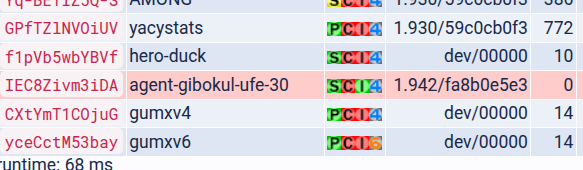
Hi I recently deployed a YaCy 1.942. Reaching senior status where external nodes can reach mine wasn’t trivial despite various forum / github posts so I’ll summarize here - in case it can help people in the future.
The main unusual point to understand is we have to split flows between regular https for web traffic and separate unaltered flow for p2p.
1st Caddyfile
External-facing Caddy which handles TLS / Let’s Encrypt / etc:
# search: 80 for p2p, 443 for web/https.
search.example.com:80 {
        reverse_proxy search_caddy:80
}
search.example.com:443 {
        header Strict-Transport-Security max-age=31536000;
        reverse_proxy search_caddy:80
}
The main trick here is I use port 80 for p2p, which is the port advertised to external nodes, and 443 for regular https for web traffic.
There may be a way to keep it all on port 443 by playing with listener_wrappers/http_redirect but I couldn’t get that to work.
2nd Caddyfile
Caddy to bridge between external Caddy and internal Docker network:
:80 {
        reverse_proxy yacy:8090 {
                # https://github.com/yacy/yacy_search_server/blob/master/defaults/yacy.init > server.reverseProxy.trusted
                header_up X-Real-IP {client_ip}
        }
}
Dockerfile to build my YaCy
I tried using env vars but had issues that another github user also encountered; unfortunately his PR didn’t seem to work for me: Fix env vars for camelCase settings by mmeier86 · Pull Request #797 · yacy/yacy_search_server · GitHub
So I build a Docker image with these seds to apply my own conf (I have more but I stripped to those important here):
FROM yacy/yacy_search_server:latest
# https://yacy.net/operation/yacy_conf/
RUN sed -i \
	-e '/^upnp[.]enabled[[:space:]]*=.*/c\upnp.enabled=false' \
	-e '/^staticIP[[:space:]]*=.*/c\staticIP=search.example.com' \
	-e '/^publicPort[[:space:]]*=.*/c\publicPort=80' \
	-e '/^server[.]https[[:space:]]*=.*/c\server.https=false' \
	-e '/^server[.]reverseProxy[.]trusted[[:space:]]*=.*/c\server.reverseProxy.trusted=172[.](1[6-9]|2[0-9]|3[0-1])[.].*' \
	/opt/yacy_search_server/defaults/yacy.init
RUN sed -i \
	-e 's/fatal: not a git repository [(]or any of the parent directories[)]: [.]git/dockerlatest/g' \
	/opt/yacy_search_server/defaults/yacyBuild.properties
In the first part we tell external nodes they can reach us via search.example.com:80 and we disable app-provided HTTPS in favor of Caddy’s HTTPS.
The last sed fixes erroneous version numbers advertised to external nodes:
"Version":"yacy_v1.942_dockerlatestdockerlatest_dockerlatest",
instead of
"Version":"yacy_v1.942_fatal: not a git repository (or any of the parent directories): .gitfatal: not a git repository (or any of the parent directories): .git_fatal: not a git repository (or any of the parent directories): .git",
Debugging
Opening https://search.example.com/p2p/seeds.json was quite useful; the first node you see there is your own instance. You want that to contain:
{
  "peers": [
    {
      "Version": "yacy_v1.942_dockerlatestdockerlatest_dockerlatest",
      "IP": "search.example.com",
      "PeerType": "senior",
      "Address": [
        "search.example.com:80"
      ]