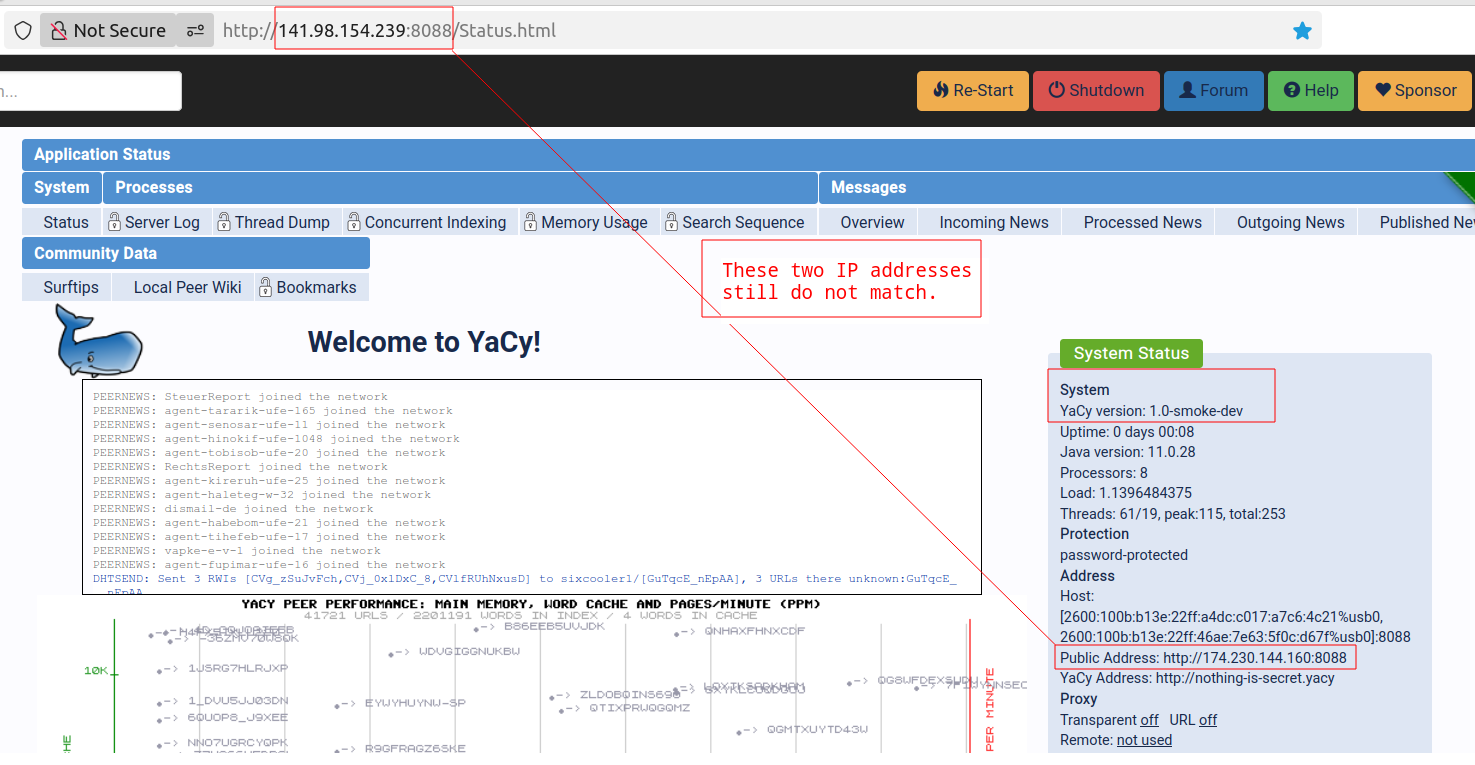
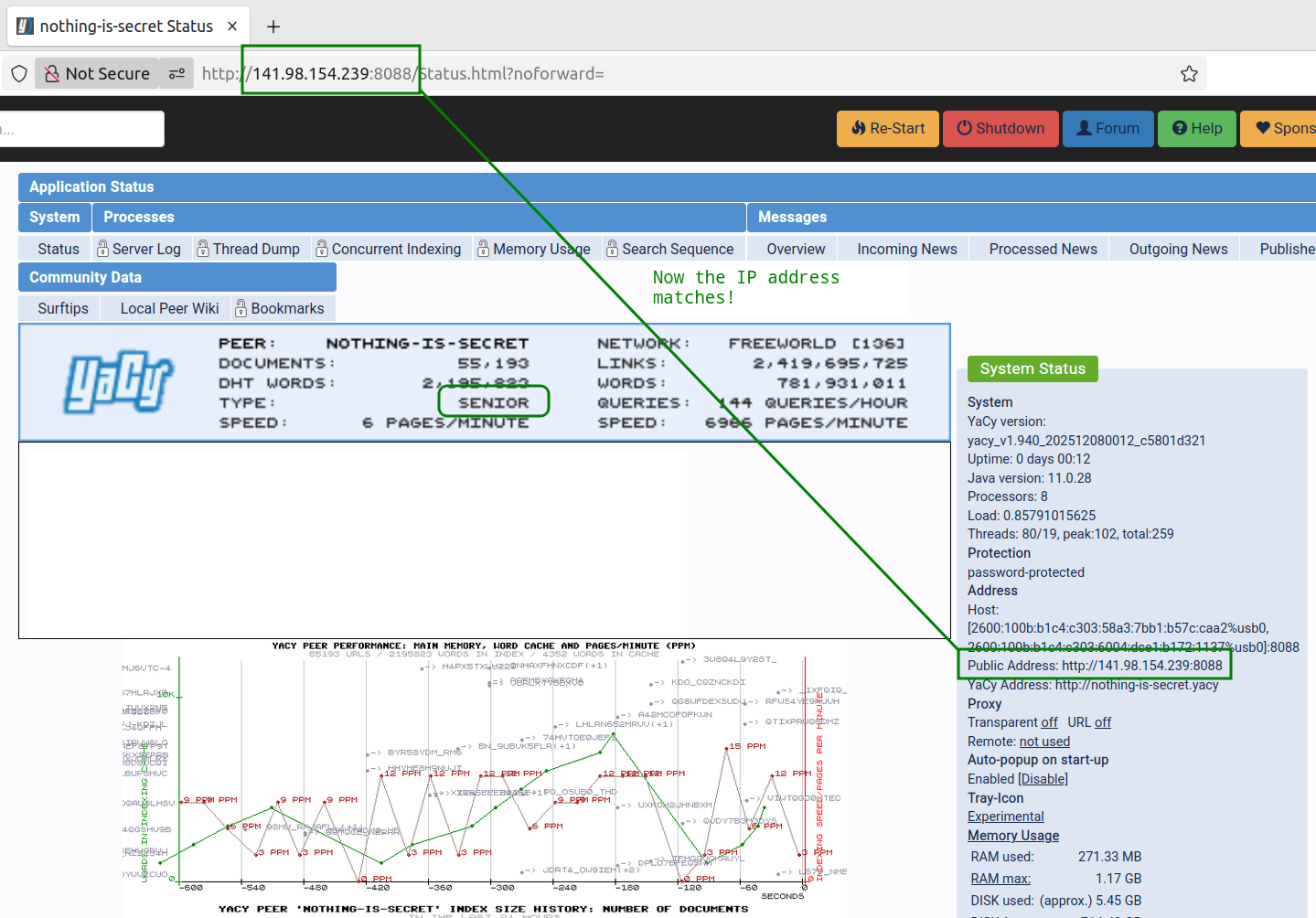
My home computer running Yacy is stuck in Junior mode, meaning peers cannot connect. But my home computer has a dedicated IP address through a reverse SSH tunnel. Yacy does not appear able to see the correct IP address, so peers cannot connect.
Your idea seemed worth a try. I cloned Yacy and ran the latest code, but still, even with a dedicated IP address, my home machine cannot be seen by peers.
(http://filsofia.com/share/20251218-cloning-yacy---web.mp4)
Also, I am not sure how to use a DATA folder from an older Yacy installation. But I can run the older Yacy version and all the crawls and settings are preserved, so there is no loss here. But there is no gain, either, in getting peers to discover my home machine.
You have to dump the solr index and restore it the new yacy.
Title: Reverse tunnel and Junior peer mode (question)
@ExploreTruth Do you agree that this covers your setup?
Hi, All
I’m running YaCy behind a CGNAT ISP and exposing it via a reverse SSH tunnel on a VPS with a stable public IP and port.
From the Internet the service is reachable, but YaCy stays permanently in Junior mode.
After testing the current GitHub version (including the bind-address option), this seems expected: YaCy requires direct inbound TCP reachability for its self-connect test, and reverse tunnels are not considered.
Just a question: has there ever been consideration for an explicit, opt-in external address / alternative reachability check, for advanced users behind CGNAT?
No suggestion to change defaults or trust forwarded connections automatically.
If this is simply out of scope by design, that’s fine — I mainly wanted to confirm the limitation is intrinsic.
Thanks,
— Roamn
If I have a go to patch separate copy of Yacy are you willing to test it?
Your description does indeed match my setup and probably would describe other peers that would like to participate in this project, but cannot. The network shows many Junior peers. The internet has changed since Yacy first emerged. Years ago it was fairly easy to host Yacy using a home internet connection on a fixed IP address, but not any more with cell phones connections, dynamic addresses, IPv6 and NAT.
If you are willing to try to improve the code, I am willing to test it.
I don’t know if he uses tunnels or how he has managed to use one IP address.
I currently have two machines using the same IP address but through different ports.
(http://141.98.154.239:8088) Junior - not online all the time - using tunnel - machine in Arkansas - no router - cell phone internet connection with USB tethering - should be accessible from any web browser when it’s online, but Yacy peers report the machine on port 8088 as a Junior.
Edit: I went back and made sure to build the fork. I think I skipped that the first time. And that produced compiler errors.
Build failure summary (smoke fork):
Attempted to build on branch smoke-main using Ant.
Compilation stopped with 38 errors, all pointing to missing class net.yacy.peers.operation.yacyBuildProperties.
My computer used to compile the code:
Java version: OpenJDK 11.0.28
ant clean all
OS: Ubuntu (Linux Mint)
The fork’s build process did not generate yacyBuildProperties.java. This caused the compiler to fail. Any ideas?
public final class yacyBuildProperties {
public static final String yacyVersion = “smoke-dev”;
public static final String gitRevision = “unknown”;
public static final String buildDate = “unknown”;
}
Then:
ant clean all
This is not for releases — only to unblock compilation.
Maybe java 21 needed?
I will have to setup that and try my cell phone to see if that works.
So your fork successfully put the working dedicated IP address from my SSH tunnel in the configuration file, but Yacy still does not seem to respect that in the System Status, using instead my cell phone’s public gateway, which cannot receive inbound connections, so it calls my peer Junior.
I wanted to share where I’ve ended up so far in case it helps someone else or sparks further ideas.
YaCy still classifies the peer as Junior. From what I can tell, System Status and reachability logic seem to prefer the observed outbound IP (in the case a mobile/cellular gateway) over the configured/advertised address. Because inbound reachability can’t be verified against that observed IP, the reverse-connect test fails and the peer is downgraded.
At the moment, this looks less like a simple config or Java issue and more like a topology mismatch. YaCy’s assumptions about symmetric inbound/outbound connectivity make sense for directly connected hosts, but they don’t seem to map cleanly onto setups involving mobile networks, CG-NAT, or other asymmetric paths.
I may be missing something, but I don’t yet see a clean way to reconcile this without a broader change in how reachability is evaluated (for example, some form of tunnel- or asymmetric-aware handling).
For now, I’m pausing on this and would be very interested to hear if anyone has approached this differently or has insights into parts of the code I may have overlooked.
Hopefully sharing this context is useful, and thanks again for the ideas so far.
i just use reverse ssh tunnel as described here.
then you just set ip address of your instance to the external ip address in /Settings_p.html?page=ServerAccess (staticIP).
works well for me.
not sure about all these patches. @roamn, do you use AI to generate them?
I do use AI to help generate, review, and experiment with patches — that’s why I keep two copies: one moderate baseline and one for testing wild changes.


 This is not for releases — only to unblock compilation.