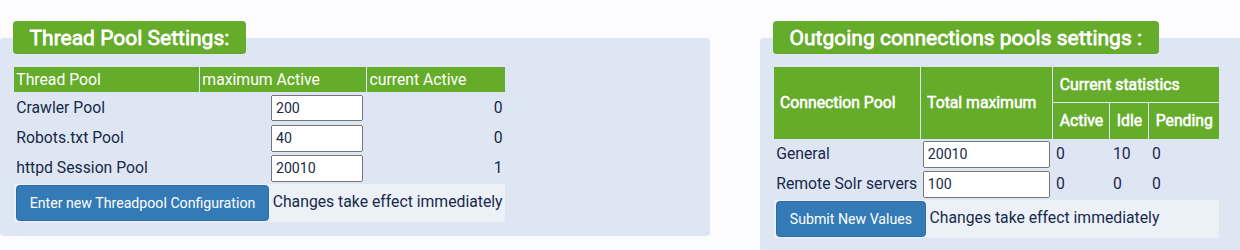
There is a critical bug in YaCy 1.941 where the httpd Session Pool size (configured via /PerformanceQueues_p.html) is not persisted across server restarts. The UI saves the value to yacy.conf, but the server ignores this value on startup and always resets to the hardcoded default of 200.
This makes it impossible for public peers to permanently increase their connection limit, causing persistent 503 errors during periods of high network traffic (such as the recent query flooding).
Steps to Reproduce:
-
Go to
/PerformanceQueues_p.html -
Change the “httpd Session Pool” value from 200 to 2000
-
Click “Set Configuration”
-
Verify the value is written to
DATA/SETTINGS/yacy.conf:bash
grep "httpdMaxBusySessions" DATA/SETTINGS/yacy.conf # Output: httpdMaxBusySessions = 2000 -
Restart YaCy (
./stopYACY.sh&&./startYACY.sh) -
Check
/PerformanceQueues_p.htmlagain — the value has reset to 200.
Root Cause:
The setting is saved in PerformanceQueues_p.java (line 316):
java
sb.setConfig("httpdMaxBusySessions", maxBusy);
ConnectionInfo.setServerMaxcount(maxBusy);
However, a search of the source code reveals that httpdMaxBusySessions is never read from the config file at startup. There is no corresponding getConfig("httpdMaxBusySessions", ...) call during server initialization.
As a result, ConnectionInfo.serverMaxcount always falls back to the hardcoded default (200) when the server boots.
Impact:
-
Public peers cannot permanently increase their session pool size.
-
During network floods (e.g., the recent issue with yacy.space sending excessive queries), peers hit the 200 connection limit and return 503 errors.
-
The 503 error message instructs users to increase the pool size in
/PerformanceQueues_p.html, but this change is lost on the next restart, creating a frustrating loop. -
Workarounds (Java system properties like
-Djetty.server.maxConnections=2000) do not fix the 503 error becauseMonitorFilterchecksConnectionInfo.getServerMaxcount(), which remains stuck at 200.
Suggested Fix:
Add a config read during server startup to initialize ConnectionInfo.serverMaxcount from the saved config value, for example:
java
int maxBusy = sb.getConfigInt("httpdMaxBusySessions", 200);
ConnectionInfo.setServerMaxcount(maxBusy);
Environment:
-
YaCy version: 1.941
-
OS: Ubuntu 20.04 (VPS)
-
Java: OpenJDK 17